Aristotle was one of the first to write about gravity. Although, there is a great scene in 2001: A Space Odyssey where a bone becomes a space ship, so maybe the pre-humans wondered, “why does that stuff fall?”. Later Galileo and Newton tested the theories proving certain truths, and Einstein created more theories with mathematical grounding. That’s all well and good, but do you care? As a game designer do you feel the need to learn Newtonian Physics?
I originally went to school as an engineering designer. Calculus was the name of the game because the designer needed to know about forces. The day I realized that I could kill someone if my calculations were off was my first step toward Digital Arts.
Lets face it, this math is complicated. I feel that as game designers, we need to understand what our code is doing. With programming, we can break up the parts of the code into smaller chucks so we can understand the entire mechanic, without getting into general relativity (although mastering that could make an amazing game).
Think it out first
Lets start my writing a narrative of what happens when a character jumps. You can go here to play with an example.
- Character is at rest, held down on the ground which is stopping him from falling to the center of the earth (or at least in a pitfall)
- Player hits the space bar. Character goes up. Gravity pulls the character downward, decelerating the assent until the distance the player moves up is less then gravity
- When the assent reaches the apex the character starts to fall, gravity accelerates the character ever faster until….
- The character hits the ground and stops falling.
So lets use our visual minds to see what that will look like. Keep in Mind, we are only going up and down, not left or right
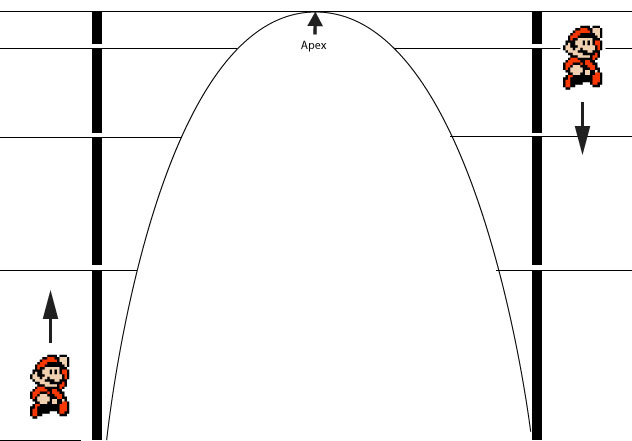
if you do remember some math stuffs from high school, you will remember that the shape is a parabola. These can be represented with mathematical equations that looks like this:
y = -x²+2x+1
but this uses the x and y coordinates, and might not be flexible enough for a platformer. The motion in a more simplified manner most resembles the change of Y in the positive part of a sine wave, but again, I want to make this as simple as possible. I do not believe there will be any real efficiency gain by using ether of these methods, compared to the very simple method I have proposed.
Lets think like a programmer for a second. Our game’s interactions, animations, processing and such is going to be happening in steps or frames. So when a character moves 10 pixels every frame they are moving at a constant pace, lets call that speed. If you take away a pixel from the speed every frame, the character will decelerate. If you add a pixel from the speed every frame, the character will accelerate.
In pseudo-code moving up and decelerating will be like:
int speed = 10
if(frameLoop){
  if(speed>0){
    character.y-=speed;
    speed--;
  }
}
and moving down and accelerating will be like:
int speed = 0;
if(frameLoop){
  character.y+=speed;
  speed++;
}
all together the pseudo-code with some commenting would look something like this
if(rising){//if going up
  yspeed-=gravity//apply gravity to current speed
  y-=yspeed//move the object
  falling=false
  if(yspeed>gravity){
//if going up slower then gravity
//start going down
   falling=true
   rising=false
  }
}else if(falling){//if going down
  yspeed+=gravity//apply gravity to current speed
  y+=yspeed//move the object
  rising=false
}

if(hitting the floor){
//only fall till you hit the floor
  rising=false
  falling=false
}

if(space bar hit and not rising and not falling){
  yspeed=jump power//apply the upward jump power
  rising=true;//RAISE IT UP!!!!!
}
And then when you want to jump, you set rising=true;
This concludes the theory and planning bit, now lets write some code!!!
Make it happen
I am going to make a very simple program in Processing that has a ball jumping off a ground that is a set height. Variable height ground and hit detection will be covered in a later tutorial. To keep things organized and reusable I will make a ball class and then extend it with a jumperBall class. The ball class is fairly straight forward, feel free to change the colors to your liking. the x and y should be the place you want the ball to start at, and the diam is the diameter of the ball
class Ball{
  float x,y,diam;
  Ball(float tx, float ty, float tdiam){
    x=tx;
    y=ty;
    diam=tdiam;
  }
  void update(){
    fill(255);
    stroke(0);
    ellipse(x,y,diam,diam);
  }
}
If you are new to Object Oriented Programming you might go ahead and make sure you can make this class into an object. I would generally define the object globally, create the instance in setup() and run the update(). in draw(). You should get all ball right in the middle of the window.
Ball b1;
void setup(){
  b1 = new Ball(width/2,height/2,20);
}
void draw(){
  background(100);
  b1.update();
}
of course the beginning of the JumperBall class is a lot of repeating stuff in the constructor. the groundHeight is the height that the ground is at, or where you want the ball to make contact with the ground. The gravity is the gravity the force that pulls down on the ball. 1 works well here, .2 is like being on the moon, while 3 is how it would be on the surface of Jupiter if it had a surface. Power is how much umph you want to put into jumping up.
class JumperBall extends Ball{
  float groundHeight,gravity,power,yspeed;
  boolean rising, falling;
  JumperBall(float tx, float ty, float tdiam, float theight,float tgrav,float tpower){
    super(tx,ty,tdiam);
    groundHeight=theight-(tdiam/2);
    gravity=tgrav;
    power=tpower;
    yspeed=0;
    rising=false;
    falling=true;
  }
the class has an update function where all the magic happens. This is what I described in the pseudocode.
  void update(){
    super.update();
    if (rising) {
      yspeed-=gravity;
      super.y-=yspeed;
      falling=false;
      if (yspeed<gravity) {
       rising=false;
       falling=true;
      }
    } else if (falling) {
      yspeed+=gravity;
      super.y+=yspeed;
      rising=false;
    }
    if(super.y>=groundHeight){
      falling=false;
      rising=false;
    }
  }
Last we need a jump function to make the bugger go up.
 void jump(){
    if(!rising&&!falling){
      yspeed=power;
      rising=true;
    }
  }
}
Generally, I wouldn’t build a whole class just like that. You add parts to it and see if they are working. If you iteratively program your work you will find it much easier to find your bugs. Lets start connecting all the wires slowly and see if everything works.
JumperBall b1;
void setup(){
  b1 = new JumperBall(width/2,height/2,10,height-30,.98,10);
}
with the above I have started the ball in the middle of the screen with a diameter of 10. I have stated that the ground is going to be 30 pixels above the bottom. I have made the gravity .98 and the jumping power is 10. Now add b1.update() to draw() and you should see the ball drop. Adding a ground and a background, the draw should look like this
void draw(){
  background(100);
  noStroke();
  fill(0);
  rect(0,height-30,width,30);
  b1.update();
}
lastly, we can make the ball jump by calling b1.jump() pretty much anywhere, but here I will attach it to the key press on the space bar
void keyPressed(){
  if(keyCode==32)b1.jump();
}
Those last two params will make the ball jump in different. This is what you would mess with the make the gravity work in different ways.
This same idea works in ActionScript and JavaScript as well
Up next
I will make the ball into a sprite, and make the ground variable heights. STAY TUNED
Leave a Reply