If you are good at coding you might go ahead and do things without testing them and you might not have any issues. As someone who has been coding for many years, I find that building things with small iterations is best. You are so much less likely to run into an issue.
In the case of Games I like to build from the main game mechanic outward. It’s the most important part of the game, making it secondary might mean it is not well polished.
We are going to build a memory card flipping game using Stencyl 3.0 so lets get the pseudo-code out of the way first, or at least a part of it. The card behavior.
A player clicks the card
- flip the card
- if there is another card flipped over that has the same value, it's a match.  Remove both cards, add a point to the score
- else if there is another card flipped over and the two cards do not have the same value, it's not a match, flip both cards back over
- else if there are no other cards flipped over, record the type of card flipped so the comparison can be made in the above logic
from the above pseudo-code we know we are going to have to keep track of the cards that are flipped. Stencyl uses game attributes as global variables, or values that are available to all the actors in the game. So we will make a list of the cards that have been flipped.
For the purpose of this tutorial, I found some open source playing card images and converted them to jpegs. Feel free to use what you want. You will need a front and back of a playing card to start, and later, more fronts of the cards.
Getting started
 In Stencyl I create a new game called “Card Flip Tutorial”

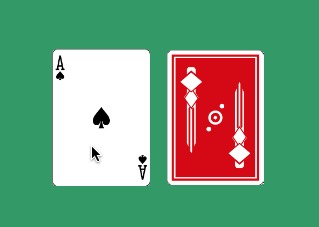
And then create a new actor called “Ace of Spades”

I then add the images of the front and back of the Ace of Spades as animations. I name them, front and back, and make sure they don’t loop. Back should be the first animation (the one with the star), as it will be the one shown when we start.

 We need a scene for this all to take place. I made mine green like a card table. Then I brought 2 Ace of Spades actors out onto the stage.

At it’s most simplest, we need to flip a card when the player clicks on it. So we will add the following actions to the events tab of the Ace of Spades actor. When the card is pressed we switch to the front animation


Test your game! When you click a card, does it show the face of the card? If not, go back and make that happen before moving on.
A more in-depth card behavior
We know we are going to be applying this behavior to a card later, so while building the card behavior we need to keep that in mind and use the available attributes to keep any actions as generic as possible. We also need some feedback because reading the log viewer in flash isn’t really ideal. I have covered creating a super easy HUD in another post. TLDR: Send user feedback to a text variable, draw the text variable in an actor.
I need to make some game attributes to control the game flow.
Cards Flipped - List - to keep track of which cards are flipped over
Sets Remaining - Number - to keep track of the remaining sets
Sets Matched - Number - to display the score in the HUD

We also need to create a group for our cards. When two cards that are not the same are flipped, all of the cards need to flip back, so we use groups to tell the program that.

Now, following the pseudo-code from the beginning of this tutorial we create an event behavior in the Ace of Spades

This is a good place to stop and test to see if you’ve messed anything up. Did everything come together as planned?
Building onto what we have
As I said before, we don’t need to create a masterpiece from the start. It could be said that all programing is best done iteratively like this. Next we are going to apply the code to another card and see if it works. To do that, we are going to create a custom actor behavior. Back on the dashboard I create a new actor behavior using the Design Mode and Actor Behavior radios. I named it card flip.

I am going to copy the code from the Ace of Spades actor and paste it into this behavior so we can use that code over and over on all the cards

and paste

I had to place the pasted code into the event block.Then go back to the Ace of Spades actor and disable the On Actor Event

Now we can apply this behavior to all the cards we want. Apply it to the Ace of Spades via the behavior tab. Test again for good measure.

Now go ahead and create as many other card actors as you like, applying the behavior as you go. Follow the guide above if you need any help.

Don’t forget to set the group for the new cards to “Cards”, and to name the animations front and back

Drag out sets onto the page. Make sure you bring them out in sets. Test your game!
Not a game yet!
Not so fast. We still need a win state for this to make it somewhat of a game. We are going to use the two variables we made earlier. In the Card Table Scene’s Events set the variables to initialize when the scene is created. I set “Sets Matched” to zero to start and since I only have two sets on the stage, “Sets Remaining” is set to 2.

In the CardFlip behavior I added some iterators to those variables 
Now we need a win state, or in the case of Stencyl a win scene. Create a new scene called “Win” I am going to use my HUD actor to show the win feedback, but you could add anything here. Just make sure you inform the user they won!

Now we need to move from the Card Table scene to the Win scene when the game Attribute, Sets Remaining is Zero. We would need to measure that when the program is updating, on the Card Table scene.

test!
What next?
The the main game mechanic is the card flip behavior. This controls most of what happens in the game.
What else could you do? It is certainly going to be a boring game with just two sets of cards, always in the same place. Adding them to the stage dynamically and randomly sounds good.
Also, I think some of the action occur too fast. Adding some “Do After _ sec” blocks will make it a bit more user friendly.
Now that everything is working it’s time to polish it up.

Leave a Reply